How I Version, Test, and Evaluate Prompts in Production
Published · Last updated · 6 min read
When building an early prototype, embedding a system prompt directly inside application code feels harmless:
# A typical early prototype:
system_prompt = f"""
You are a customer support specialist.
Answer customer inquiries using only the policy below:
{policy_docs}
"""
In production, that string is not just text—it dictates how the model behaves, what it refuses, how it handles edge cases, and how many tokens it consumes.
If you treat it as just another string variable in application code, a single innocent edit can alter user experience without triggering a single compiler error or unit test failure.
Here is the story of how we moved away from hardcoded strings, set up dedicated dev and prod prompt environments, and why versioning prompts is an essential engineering discipline.
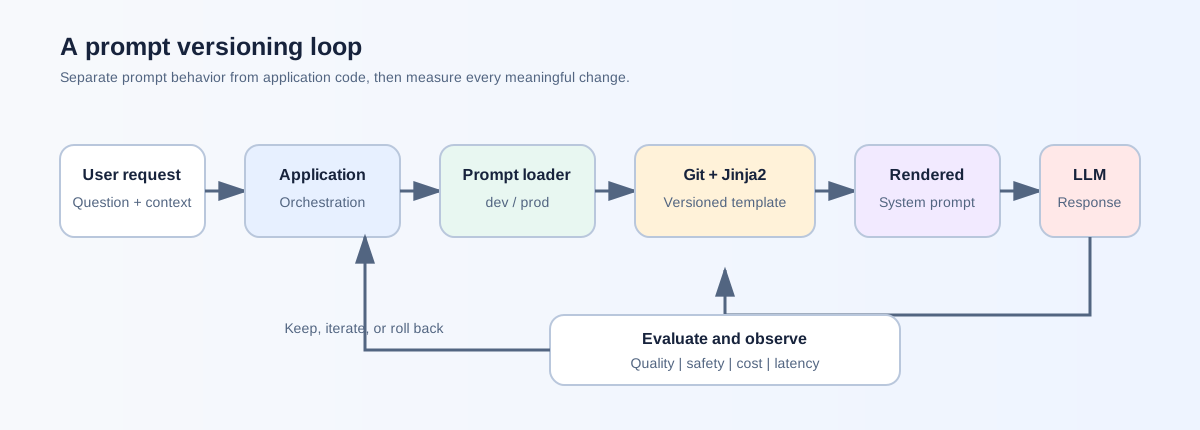
The catalyst: why hardcoding prompts became an operational bottleneck
In our early setup, whenever someone wanted to refine how the assistant answered questions or handled edge cases, they modified a Python string and pushed a commit.
That quickly ran into real operational problems:
- No clean rollback path: If a revised prompt led to awkward answers or unexpected refusals in production, rolling back meant reverting code, rebuilding the container image, and running a full deployment pipeline.
- Blurred boundaries between instructions and data: When user context is simply string-concatenated into instructions, the boundary between trusted system rules and untrusted external text is fuzzy.
- Accidental leakage across environments: Experimental prompt variations tested locally during development could easily slip into production PRs unnoticed.
The first step forward was separating the prompt text from the Python orchestration logic entirely.
prompts/
  prod/
    support_assistant.j2
  dev/
    support_assistant.j2
By storing prompts in Jinja2 template files, the application code focuses purely on orchestration, while the prompt templates declare clear data boundaries:
You are a customer support specialist for an e-commerce platform.
Help the user resolve their inquiry based strictly on the verified policies below.

<<<BEGIN_POLICY_CONTEXT>>>
{{ policy_docs }}
<<<END_POLICY_CONTEXT>>>

Customer Status: {{ customer_tier | default('standard') }}
Allowed Refund Limit: ${{ max_refund_amount | default('50') }}
Using explicit delimiters (<<<BEGIN_POLICY_CONTEXT>>>) makes the separation between system instructions and retrieved context clean and unambiguous for both engineers and the model.
Prompt changes are interface changes: testing the rendering contract
One realization that fundamentally changed our workflow was that a prompt change is rarely just a text change—it is an interface contract.
Notice the {{ customer_tier }} and {{ max_refund_amount }} parameters above. If the backend service forgets to pass customer_tier during request processing, the template doesn’t crash; it silently falls back to 'standard'.
The application remains green in health checks, but premium customers quietly stop receiving premium handling.
To catch these mismatches before deployment, we started writing strict unit tests for the rendering contract:
import pytest
from app.services.prompt_service import render_support_prompt

def test_vip_customer_renders_elevated_refund_limit():
    rendered = render_support_prompt(
        policy_docs="Standard 30-day return policy applies.",
        customer_tier="vip",
        max_refund_amount=250
    )
    assert "Customer Status: vip" in rendered
    assert "Allowed Refund Limit: $250" in rendered
    assert "<<<BEGIN_POLICY_CONTEXT>>>" in rendered

def test_missing_policy_context_fails_fast():
    with pytest.raises(ValueError, match="policy_docs cannot be empty"):
        render_support_prompt(policy_docs="", customer_tier="standard")
These unit tests do not evaluate whether the model’s answers are intelligent; they verify the rendering contract—guaranteeing that upstream application code and the template agree on required variables, defaults, and context delimiters.
Managing dev vs. prod with an environment-aware loader
Instead of sprinkling if env == 'dev' checks across route handlers, we centralized prompt resolution into a dedicated loader.
import os
from pathlib import Path

PROMPTS_DIR = Path(__file__).resolve().parent / "templates"

def load_prompt_template(template_name: str, env_override: str | None = None) -> str:
    target_env = env_override or os.getenv("PROMPT_ENV", "prod")

    if target_env not in {"prod", "dev"}:
        raise ValueError(f"Unknown PROMPT_ENV '{target_env}'. Must be 'prod' or 'dev'.")

    template_file = PROMPTS_DIR / target_env / f"{template_name}.j2"
    if not template_file.exists():
        raise FileNotFoundError(f"Missing prompt template: {template_file}")

    return template_file.read_text(encoding="utf-8")
Two deliberate design constraints protect production:
- Defaulting to
prod: IfPROMPT_ENVis unset in a new container, the loader defaults to production templates instead of untested development experiments. - Failing closed: If someone misconfigures the variable (e.g.,
PROMPT_ENV=staging), the service fails immediately at container startup rather than making an arbitrary guess.
| Configuration | Loaded Path | Behavior |
|---|---|---|
PROMPT_ENV unset | prompts/prod/ | Safe default |
PROMPT_ENV=prod | prompts/prod/ | Standard production |
PROMPT_ENV=dev | prompts/dev/ | Staging / experimental |
PROMPT_ENV=staging | Throws ValueError | Fast-fail on unmapped environment |
Evaluating candidate prompts: why small manual checks are deceptive
Once we had separate environments, iterating on candidate prompts became significantly faster. But it also revealed another trap: relying on quick manual checks.
When you tweak a prompt—for instance, trying to make answers more concise or reducing unnecessary refusals—it is tempting to run 3 or 4 sample questions in a notebook, see good answers, and declare the new prompt a winner.
In practice, eyeball evaluations on small samples are deceptive:
- A prompt that sounds punchier on 5 test questions might accidentally strip out critical policy disclaimers on edge cases.
- A prompt tuned to be less conservative might begin hallucinating answers when no policy documentation is found.
Instead of guessing, we started running side-by-side comparison runs on a fixed evaluation set of representative customer inquiries. Comparing candidate outputs against baseline outputs before swapping the production template gave us visibility into subtle regressions we would have otherwise missed.
Architectural evolution: moving prompts to Blob Storage / Data Lake
Managing prompt files in a Git repository was a huge leap over hardcoded strings. But as systems grow, keeping prompt files bundled inside application containers reveals its own operational ceiling:
Every prompt refinement still requires a Git commit, a CI pipeline run, and a container redeployment.
Local Files in Git (Phase 1)
       │
       ▼
Cloud Blob Storage / Prompt Registry (Phase 2)
       ├── gs://ai-prompts/support_assistant/v1.0.0.j2
       ├── gs://ai-prompts/support_assistant/v1.1.0.j2
       └── gs://ai-prompts/support_assistant/v2.0.0.j2
A more scalable architecture is moving versioned prompts into Cloud Blob Storage (such as Google Cloud Storage, AWS S3, or Azure Blob) or a centralized prompt registry:
# Scalable pattern: Resolving versioned prompts from Cloud Blob Storage
def get_cloud_prompt_template(prompt_name: str, version_tag: str) -> str:
    """
    Fetches immutable prompt templates from cloud object storage.
    Example: gs://company-prompts-lake/support_assistant/v1.2.0.j2
    """
    blob_path = f"{prompt_name}/{version_tag}.j2"
    return prompt_storage_client.download_as_text(blob_path)
Why is this architectural shift so powerful?
- Decoupled release cycles: Content and prompt refinements can happen independently of core backend software releases.
- Zero-downtime, instantaneous rollbacks: If an updated prompt behaves poorly under live traffic, rolling back is as simple as flipping a version pointer in configuration (
v1.2.0v1.1.0). No container restarts or redeployments required. - Centralized governance and audit trail: Every prompt version deployed across different microservices is stored immutably in one place with timestamped access logs.
- Dynamic in-memory caching: Application pods fetch the template from blob storage on startup and cache it in-memory with a short TTL, ensuring near-instant updates with zero latency overhead on customer requests.
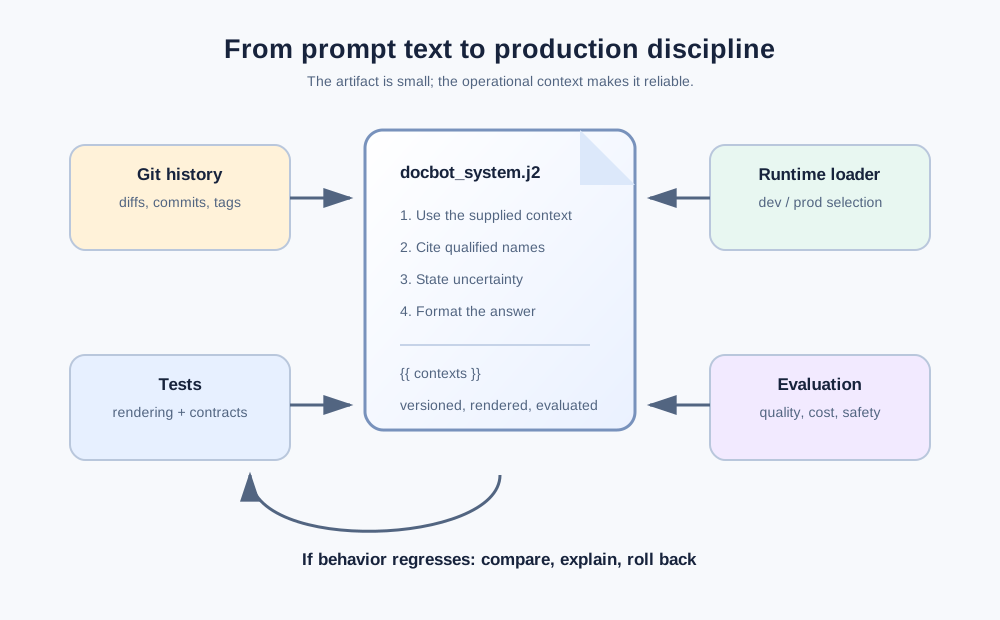
Key takeaways for reliable prompt operations
- Prompts are runtime configuration, not hardcoded strings: Treat them as first-class software artifacts with clear ownership and change control.
- Use environment boundaries: Isolate experimental prompt changes in
devbefore promoting them toprod. - Unit test your template contracts: Ensure required variables, fallbacks, and delimiters render accurately before sending payloads to the model.
- Don’t trust quick eyeballing: Run candidate prompts against a consistent set of test cases before replacing production versions.
- Decouple storage as you scale: Moving versioned templates into blob storage or a registry gives you true operational agility and one-click rollback safety.
Frequently asked questions
Why separate prompts into dev and prod environments?
It lets engineers iterate aggressively on candidate instructions locally or in staging without risking live user interactions or silent regressions in production.
Why move versioned prompts to blob storage instead of keeping them in the code repo?
Storing versioned prompts in cloud object storage (S3/GCS/Azure Blob) decouples prompt lifecycles from container build and release pipelines, enabling instant rollbacks and zero-downtime updates.
What should you test before deploying a prompt update?
Test the rendering contract first (ensuring dynamic variables, defaults, and context delimiters populate correctly), then run side-by-side comparison runs on test queries to check for unintended behavioral changes.